The Reporting Cycle: How Your Balance Reaches the Bureaus
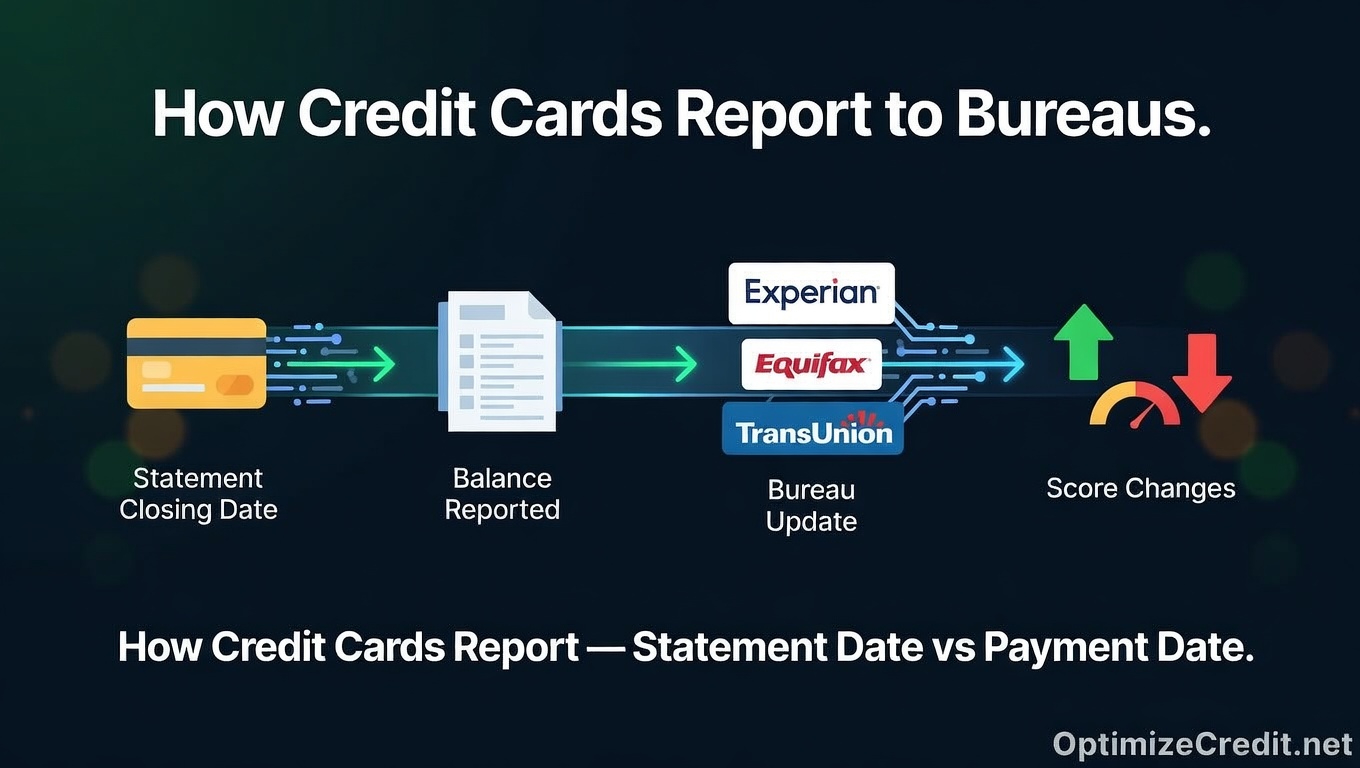
Credit card issuers report account data to Equifax, Experian, and TransUnion using the Metro 2 format — a standardized data specification maintained by the Consumer Data Industry Association (CDIA). The cycle works like this:
Billing cycle runs → Statement closes → Balance snapshot captured → Metro 2 file transmitted → Bureau ingests the file
The entire pipeline from snapshot to your credit file updating typically takes 1–7 days. During that window — and for the entire month between reporting cycles — your bureau balance is frozen. Every charge, every payment, every return that happens after the snapshot is invisible to the bureaus until the next cycle.
The Three Dates That Control Your Bureau Data
Most consumers confuse these three dates. They serve completely different functions.
Statement Closing Date (The Snapshot)
This is the most important date for score optimization. When your billing cycle ends and your statement generates, the issuer captures a balance snapshot — the exact balance on the account at that moment. This snapshot becomes the number reported to the bureaus.
If you have a $5,000 limit and $3,200 in charges when the statement closes, $3,200 is the balance the bureau sees — even if you pay it in full two days later.
You can find this date on any monthly statement (labeled "statement closing date" or "billing cycle end date") or in your online account under billing settings. It's typically the same calendar date each month, shifting by a day when it falls on a weekend.
Payment Due Date
This falls 21–25 days after the statement closing date — the grace period required by the CARD Act. This is the deadline to avoid interest charges. It has zero direct effect on what the bureau sees. The reported balance was already locked in at statement close.
The due date protects your wallet. The closing date determines your bureau data. Don't confuse them.
Bureau Reporting Date
This is when the issuer actually transmits the Metro 2 file to the bureaus. For most issuers, this happens 1–7 days after statement close. Some issuers report on the same day; others batch weekly. The balance was determined at statement close, but it doesn't appear on your credit file until this transmission date.
Why the Bureau Balance Never Matches Your Current Balance
The Metro 2 format transmits a single Current Balance field per account per reporting cycle. One number. One snapshot. Once per month.
There's no "average daily balance" field, no "peak balance" field, no record of intra-cycle payments. On any given day, your bureau balance could be higher than your real balance (you've paid down since the snapshot), lower (you've spent since the snapshot), or matching only by coincidence. Between reporting dates, your spending and payments are invisible to the scoring algorithm.
How Different Issuers Report: Not Everyone Follows the Same Rules
Statement Balance Reporters (The Majority)
Most major issuers — Citi, Bank of America, Wells Fargo, Discover, Capital One — report the statement closing balance. Whatever the balance is when the statement cuts, that's what the bureau gets. Payments made between statement close and the reporting transmission date don't change the reported number.
Chase: Mid-Cycle Zero-Balance Reporting
Chase is a notable exception. In addition to standard statement-close reporting, Chase has been observed pushing an off-cycle Metro 2 file when a card balance hits $0 mid-cycle. If you pay your Chase card to zero before the statement closes, Chase may report that $0 balance to the bureaus before the next statement even generates.
This makes Chase cards particularly useful for rapid utilization optimization — but it also means a $0 balance might report when you intended to use the AZEO method (more on that below).
End-of-Month Reporters
Some issuers — historically U.S. Bank and Elan Financial Services (which powers many credit union cards) — have reported balances based on the last business day of the calendar month rather than the statement closing date. If your statement closes on the 15th but the issuer reports on the 30th, your balance could look very different from your statement balance.
Paying Before vs. After Statement Close: The FICO Impact
This is where the reporting cycle directly affects your score. Same spending, same total paid — completely different bureau data.
Example: $5,000 Credit Limit, $2,000 Spent During the Cycle
| Pay $1,500 Before Statement Close | Pay $1,500 After Statement Close | |
|---|---|---|
| Balance at statement close | $500 | $2,000 |
| Reported utilization | 10% | 40% |
| FICO impact | Optimal range | Score compression begins |
| Estimated difference | — | 20–40 points lower* |
*Actual impact varies by overall profile, but the utilization swing from 10% to 40% on a single card consistently produces meaningful score differences.
The critical insight: the payment that matters for your score is the one that posts before the statement closes, not the one that arrives by the due date. Both keep you interest-free. Only one optimizes your reported data.
Make pre-statement payments at least 3 business days before your closing date. Payment processing takes 1–2 business days, and if it hasn't posted when the statement system runs, the pre-payment balance is what gets captured.
For a deeper look at how statement dates and bureau update timing can diverge — and how that mismatch creates confusion — see our guide on statement date vs. bureau update timing.
How This Connects to Utilization Scoring
Utilization — reported balances divided by credit limits — makes up roughly 30% of your FICO score under the "Amounts Owed" category. FICO evaluates it at two levels:
Per-card utilization: Each card's reported balance divided by its limit. FICO penalizes cards that individually report high utilization, even if your aggregate ratio is low. One card at 90% can drag your score even if your overall utilization is 15%.
Aggregate utilization: Total reported revolving balances divided by total revolving limits.
The scoring thresholds (from extensive consumer analysis):
- 1–9%: Optimal scoring band
- 10–29%: Minimal penalty
- 30–49%: Noticeable compression
- 50–74%: Significant drag
- 75%+: Severe penalty, especially per-card
For a deeper breakdown of how the math works across multiple cards and aggregate limits, see our guide on utilization math.
The AZEO Method
AZEO — All Zero Except One — is a widely used optimization technique. You pay all cards to $0 before their statements close, except one card that you let report a small balance (1–3% of its limit). This approach tends to produce slightly higher scores than reporting $0 across every account, likely because FICO's algorithm treats at least one active balance as a positive signal.
Utilization Has No Memory (With One Caveat)
Under standard FICO 8 and FICO 9 — the models used in the vast majority of lending decisions — utilization has no memory. Only the most recently reported snapshot counts. If you've been reporting 70% utilization for a year and suddenly report 8%, your score adjusts immediately on the next calculation.
The caveat: FICO 10T and VantageScore 4.0 incorporate trended data, meaning they can see utilization patterns over time. However, these models are not yet standard in most mortgage, auto, or credit card underwriting. To understand which models matter and where, see our FICO vs. VantageScore comparison.
Balance Transfers: The Double-Reporting Trap
Balance transfers deserve a specific warning. When you transfer a balance from Card A to Card B, the transferred amount appears on Card B almost immediately. But the payoff on Card A may not reflect until its next statement cycle.
During that overlap window — potentially 30 days — both cards could report the balance simultaneously, temporarily doubling your reported revolving debt. If you're timing a credit application, account for this overlap and complete balance transfers at least two full billing cycles before your target pull date.
Get Your Personalized Credit Roadmap
Upload your credit report and our Credit Analyzer identifies exactly what is holding your score back and gives you a step-by-step 90-day plan to reach 740+.
Trusted by 500+ successful placements and excellent reviews on TrustPilot ★★★★★
Analyze My Credit Free →